What happens when you add a profile
You paste the profile's link, choose how many past posts to collect, and submit. The form answers straight away, and a one-time historical collection of that profile's recent posts begins.
That collection usually takes 30–60 minutes — longer for a deeper history, or when you add many profiles at once. On Instagram the first posts alone can take up to about 30 minutes to appear.
You add a profile: one account on one platform. You can't track a single post, a hashtag, a sound or a keyword. Add the profile that posts it instead — calibration and the winner badges are built on the profile.
Pasting the link
Paste the profile's whole link straight from your browser (for example, https://instagram.com/nike), not the @handle; the form tidies it up. A link to a post, or to a platform page like facebook.com/watch, is refused on the form.
While a disruption notice is on for that platform, the form says so, and you can't add a profile there until it clears.
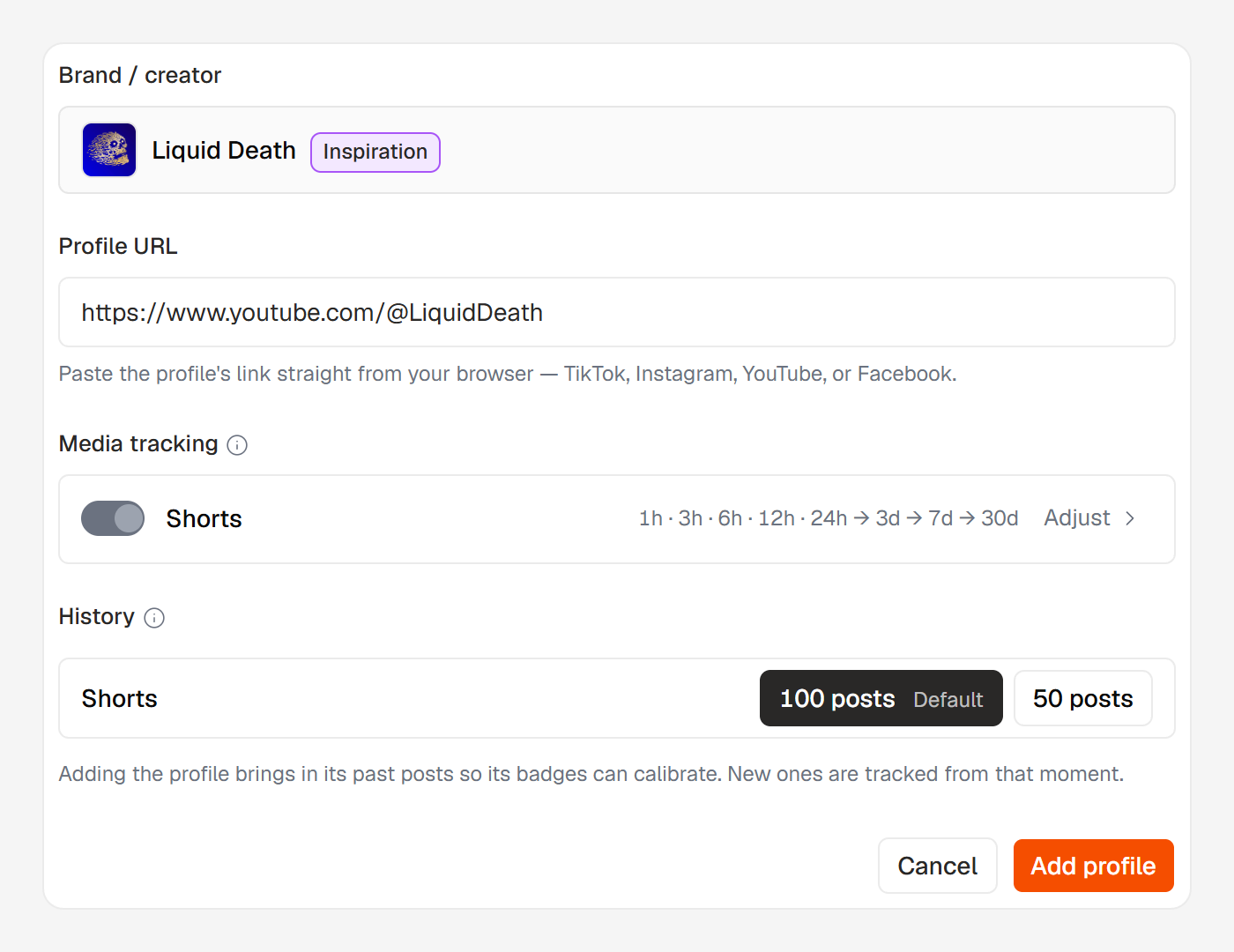
How many past posts to collect (History)
In the form's History section, pick 100 (the default) or 50. These posts are the baseline the profile calibrates against. More means stronger calibration and more past winners, but a slower first collection. It can't be changed later.
The number covers the profile's videos — Reels on Instagram and Facebook, Shorts on YouTube. Every other format comes in as its last 50, which is enough to calibrate its badges. On TikTok, one pool holds everything, so the number covers its videos, carousels and images together.
Posts come from the last 12 months, and a profile that hasn't posted that many delivers what exists. A very busy Facebook page may bring fewer.
These past posts feed calibration, the posts feed and the winners vault. Charts and monthly reports count the profile from the month you add it.
Which formats come in
The Media tracking block, just above History, sets which formats the profile collects:
- TikTok and Instagram — videos and carousels always, images if you switch them on. On Instagram, images share the carousels' 50.
- YouTube — Shorts only.
- Facebook — Reels always; Photos and Text posts if you switch them on. Photos covers single photos and posts with several photos or videos, which show as carousels. Text posts covers polls and posts that link to a web page.
New shares aren't collected: a page re-posting a post, its own or another page's, is skipped. Neither are events.
Instagram publishes no view count for carousels, so they calibrate in a pool of their own. Each pool needs 30 posts before it can hand out badges.
Why more posts arrive than you picked
Everything the profile posted in the last 3 days comes in as well as the number you picked, so more posts can arrive than you chose. A profile that posts several times a day sends more of them.
What you see while it works
The brand's page lists the profile as Setting up right away. From there the profile's own page is the live status, and both pages update on their own. A second line names the step:
Checking the profile— confirming the account can be tracked. Nothing is collected yet.Collecting posts— its posts are coming in, and the count climbs as they land. A refusal can still arrive at this step.Queued— first collections run a few at a time, so a profile added in a large batch waits its turn. It starts on its own.
The profile reads Active once it's ready.
At that moment the notifications bell tells everyone on your team who has organization notifications on.
If the submission never arrived, the form says so at once: Huntit couldn't take this profile right now. Nothing was added. Try again in a few minutes.
If the form says Couldn't confirm this went through., check your profiles in a few minutes and add it again if it isn't there.
If a first collection stops partway, press Try collecting again on the profile's page. Don't add the profile a second time — see a profile stopped collecting.
Already being tracked
If that account is already tracked, the form says so and offers an Open existing profile link. No duplicate is created.
When a profile can't be added
If the account can't be tracked, its Setting up row leaves the brand's page and a notification names the handle and the reason.
| What the notification says | What it means |
|---|---|
This account is private | A private account can't be tracked. Nothing to retry unless it goes public. |
This account hasn't posted anything yet | The account is readable and empty. Add it again once it starts posting. |
This account is already tracked | The same Facebook page is already a profile under its other link, its username or its number. Use that profile. |
This account posted no … in the last 12 months | Nothing in the formats this profile collects. The message names them, and the switches you left off. Add it again once it posts, or with one of those switches on. |
This account couldn't be read | The link didn't lead to a readable account: a typo, a rename, or an account that's gone. Paste the link again straight from the browser. |
Its posts couldn't be collected right now | Nothing is wrong with the account or the link; reading its posts failed this time. Try adding it again later. If it keeps happening, contact support. |
The check was interrupted by a temporary problem. | Rare. Nothing is wrong with the account. Add it again once, not over and over. |
posts couldn't be read during the check | Nothing is wrong with the account: new posts from that platform are held up. Add it again once the disruption notice clears. |
Adding it again is safe: a refused add leaves no profile behind.
When it isn't the profile
If your BrightData account is suspended or out of funds, the add can't finish. Fund the account, re-test the key in Settings → Credentials, then try again. See BrightData funding rules.
Nothing the tracked account can see
Huntit reads public data only. It doesn't log in to anyone's account, doesn't connect to it, and does nothing the tracked account can see.