What happens when you add a profile
You paste the profile's link, choose how many past posts to collect, and submit. The form answers straight away, and Huntit gets on with a one-time historical collection of that profile's recent posts.
That collection typically takes 30–60 minutes. Instagram takes longer — up to about 30 minutes just for the first posts to appear.
You add a profile — one account on one platform. You do not track a single video, a hashtag, a sound, or a keyword. If you want the content behind one of those, add the profile that posts it: the profile is what powers calibration and the winner badges.
Pasting the link
Paste the profile's link straight from your browser — TikTok, Instagram, YouTube or Facebook (for example, https://instagram.com/nike). Paste the whole link rather than the @handle; Huntit tidies it up for you afterwards.
The link has to name an account. A Facebook page with no username (facebook.com/profile.php?id=…) or a platform page like facebook.com/watch is refused on the form, because there is no account there to track.
If we can't collect from that platform right now, the form says so, and you can't add a profile there until it's back.
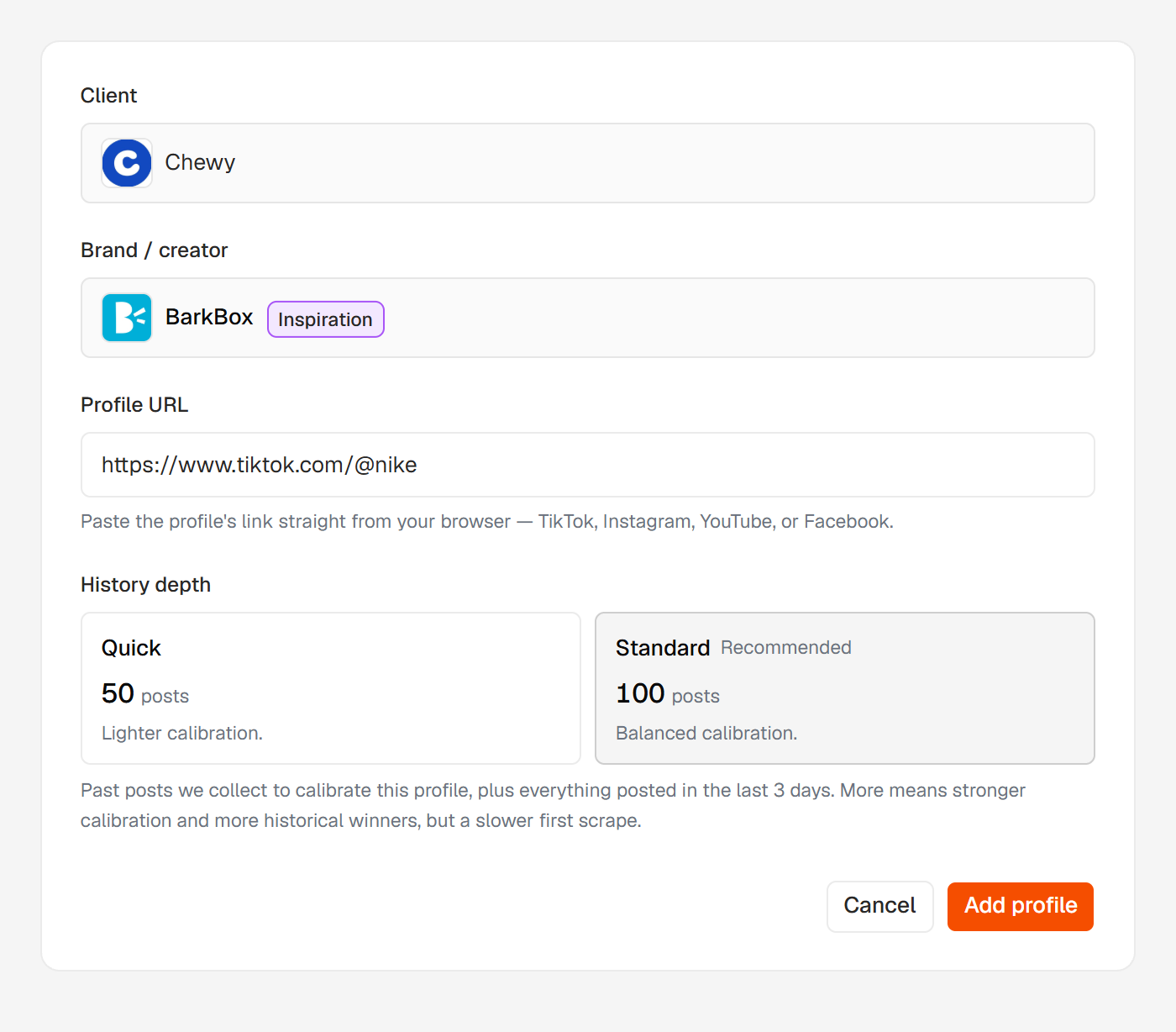
How many past posts to collect (History)
The History section sets how many past posts Huntit collects in that first pass — the baseline it calibrates against. The count is the label: 100, the default, or 50.
That number buys the profile's videos — Reels on Instagram and Facebook, Shorts on YouTube. Every other format the profile tracks gets its last 50, which is enough to calibrate its badges and isn't a choice. TikTok is the exception: it holds everything in one pool, so the number you pick covers its videos, carousels and images together.
Which formats a profile collects is the Media tracking block just above: videos and carousels are always on, and images — Photos, on Facebook — are yours to switch on.
Posts come from the profile's last 12 months, and a profile that hasn't posted that many delivers what exists.
The trade-off: more means stronger calibration and more historical winners, but a slower first collection. It's a one-and-done choice, set at add time and not changeable later.
Instagram carousels
Reels and carousels are collected separately, which is why an Instagram profile takes the longest to set up. Carousels come in at their fixed 50, whatever you picked for reels.
Carousels can't be switched off. Instagram publishes no view count for them, so they calibrate in a pool of their own, and each pool needs 30 posts before it can hand out badges.
Why more posts arrive than you picked
Everything the profile posted in the last 3 days comes in on top of the number you picked, on every platform. Pick 50 and the profile usually lands between 55 and 65 posts.
The picked number buys mature posts — old enough that their view and engagement counts have settled, which is what makes them a fair baseline. The last three days come in for completeness, so nothing the profile just published is missing while it waits to mature.
A profile that posts several times a day sends more of them, so the gap can be wider. That's the part that varies, and the profile's own page states both halves while it works: "You picked 100 reels and the last 50 carousels — everything posted in the last 3 days comes in on top of those."
What you see while it works
The form answers the moment you submit: Huntit has taken the profile, and the notifications bell reports how it turns out. There's nothing to wait for on screen.
From there the profile's own page is the live status, and it carries one of two words.
Verifying means Huntit is still checking that the account can be tracked, and nothing is being collected yet. Setting up means the first collection is running — the card names what you picked, and the post count climbs as they land.
Huntit collects a few profiles at a time, so one added in a large batch waits its turn. Its page says it is in line, collection starts on its own, and the bell fires when the profile is ready.
If Huntit can't confirm the submission arrived, the form says so — "We couldn't confirm this went through". Check your profiles in a few minutes, and add it again if it isn't there.
If a first collection stops partway, that's a different case: the profile's own page says so and carries a Try collecting again button, which disappears once you press it. Don't add the profile a second time — see a profile stopped collecting.
"Already being tracked"
If that account is already tracked for this client, Huntit tells you and offers an Open existing profile link. It never creates a duplicate.
Uniqueness is per client, though: two different clients can both track the same account, and each copy collects independently — so you pay your providers for both.
When a profile can't be added
If the account can't be tracked, no profile appears and the notifications bell carries the verdict — the title names the handle, and one sentence says why.
| What the notification says | What it means |
|---|---|
| "This account is private…" | Huntit reads public data only, so a private account can't be tracked. Nothing to retry unless it goes public. |
| "This account hasn't posted anything yet…" | The account is readable and empty. Add it again once it starts posting. |
| "This account has posted no reels or carousels in the last 12 months…" | The account is readable but published nothing in the formats this profile collects — the sentence names them. Add it again once it does. |
| "We found no reels or carousels on this account in the last 12 months, or Instagram wouldn't hand them over…" | Either that same quiet window, or the platform wouldn't hand the posts over — the answer doesn't tell the two apart. Check the account opens normally, then try again later. |
| "We couldn't read this account…" | The link didn't resolve to a readable account: a typo, a rename, or an account that's gone. Re-paste the link straight from the browser. |
| "We couldn't read this account's posts right now…" | The account and the link are fine; reading its posts failed this time. Try adding it again later. |
| "The check was interrupted by a temporary problem." | Nothing is wrong with the account — the check itself didn't finish. Add it again: one careful retry, not repeated hammering. |
Adding it again is safe — a refused add leaves no profile behind.
When it isn't the profile
If your BrightData account is suspended or out of funds, the check can't run at all, and you get "Your BrightData account needs attention" instead. Nothing is wrong with the profile: fund the account, re-test the key in Settings → Credentials, then add it again. See BrightData funding rules.
Nothing the tracked account can see
Huntit reads public data only. It doesn't log in to anyone's account, doesn't connect to it, and does nothing the tracked account can see. Adding a profile is invisible to the account you're tracking.