The post detail view
Clicking any post opens the post detail view — a single centered modal over a darkened backdrop that holds everything Huntit knows about that post. It reads top to bottom, from identity through the AI reads to the metrics and the growth chart, and it carries the buttons that generate deeper analysis.
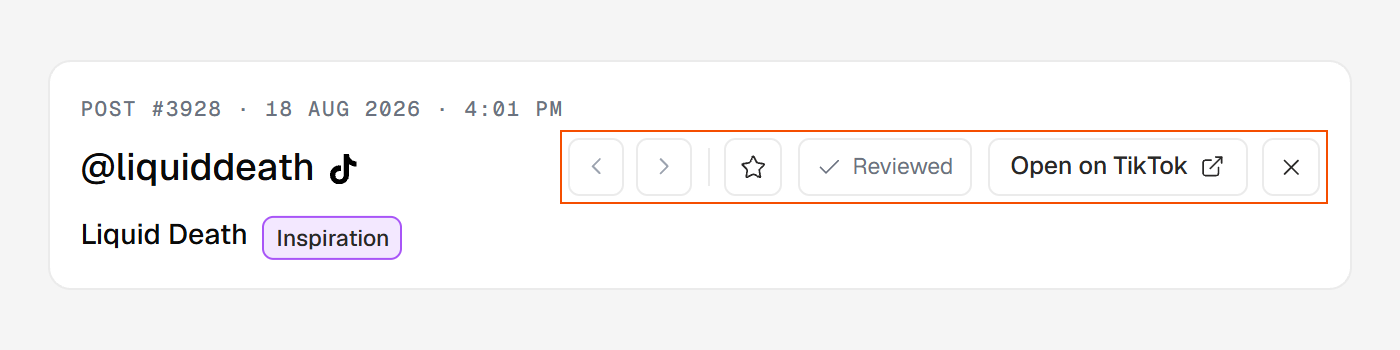
What the modal shows, top to bottom
- Header. A mono eyebrow (
POST #N · DATE), the profile@handlewith its platform glyph, and the brand name with its type chip. The right side holds the actions: previous / next navigation, the ★ favorite and ✓ Reviewed toggles, "Open on <Platform>", and close. - Media. The video (or carousel viewer) on the left, with the caption and hashtags, plus a quiet Sound link when the post has one.
- The AI reads. A grid of the AI-discovery fields: Summary, Value proposition, Content group and Content type, the Visual hook and Hook, the Outro, and — on a video — the Filming setup, followed by the collapsed transcript.
- Performance. The badge verdict merged with the metric strip — Reach, Engagement and Tracking over the raw counts. A metric the platform doesn't expose shows as
—, which never means zero. - The growth chart. How the post grew from the moment it was found. See reading the growth charts.
- Generate buttons. Three cards — Brief, Custom analysis, Comments — each opening deeper analysis in the same modal. On a video over the 5-minute AI-analysis limit a short note stands in for the Brief and Custom cards, and Comments stays. See the three on-demand analyses.
- Snapshots and tracking log. A collapsed table of every check-in, with a row in place for any that couldn't be taken.
Moving between posts
The ‹ › arrows in the header step to the previous and next post in whatever list you opened the modal from — the feed, the radar, wherever you were. The ← and → arrow keys do the same, so you can walk a filtered set without touching the mouse.
There's no "N of total" readout: the navigation spans the posts currently loaded in your view.