The posts feed
The posts feed is where every post Huntit tracks, across all your clients, lands in one browsable list.
You narrow it with filters, search it, sort it, switch between a table and a cards gallery, and pick which columns you see. Open a row to read the full post.
Filtering the feed
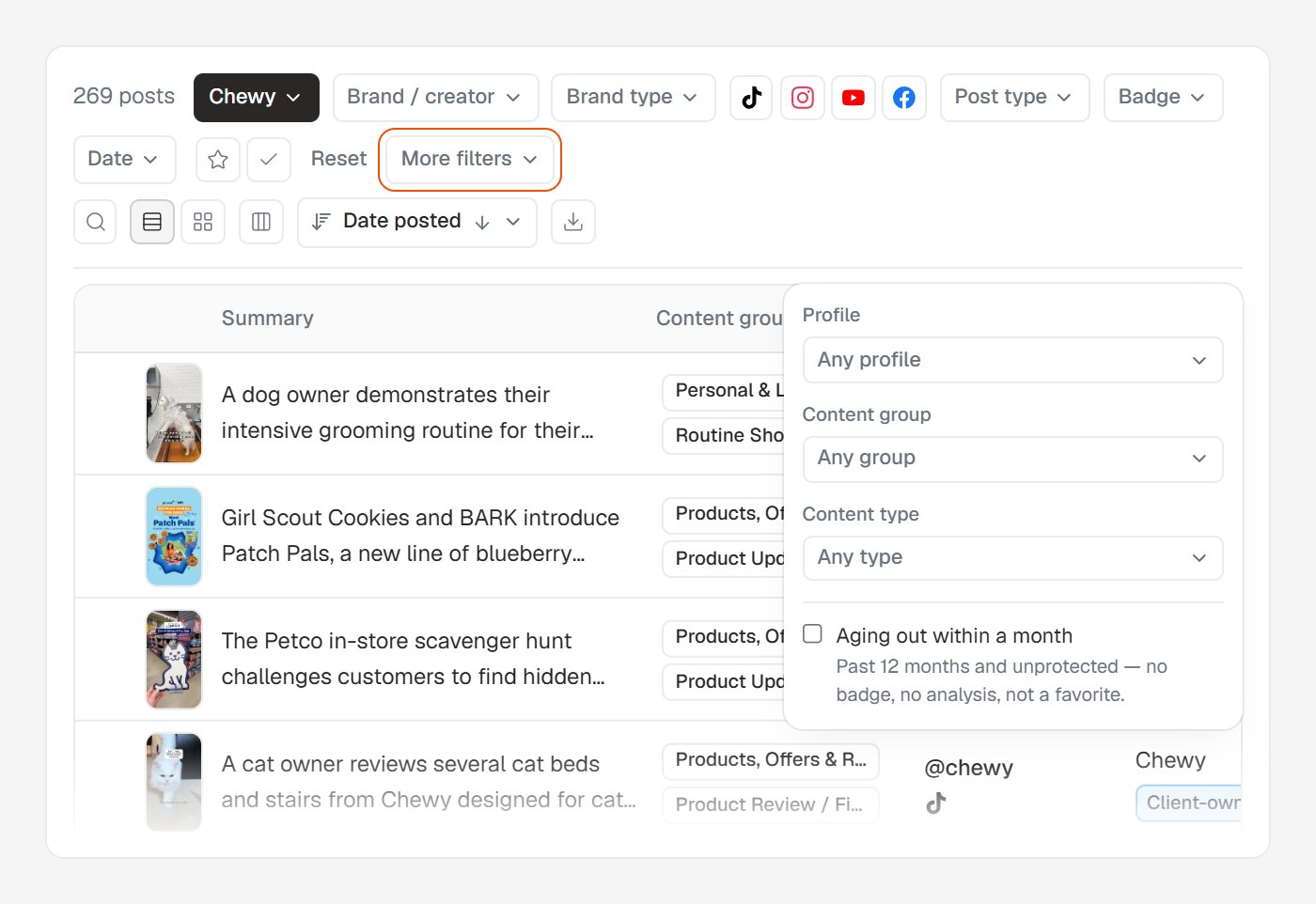
A single row of filter chips sits above the list, ordered the way you'd narrow in your head: the client first, then who published, then what kind of post, then when.
Client is single-select, because it's your working context. Everything else holds several values at once, so you can ask for two competitors on two platforms without doing it twice.
The filters you reach for less often — profile, content group, content type, and the aging-out switch — live behind More filters, which keeps the main row calm. A Reset link appears whenever a real filter is active and clears the lot in one click.
The count line on the left always reads the live total for what you've filtered to — 1,240 posts.
The same filter model powers the winners vault and the velocity radar. Learn it once, use it everywhere.
Searching the feed
The search box matches a post's caption, its AI summary and its hashtags. Paste a post's link and it finds that post — tracking parameters and all, and whichever URL shape the platform handed you. A bare post code on its own works too.
A link is only ever matched as a link. An ordinary word searches the text and never the URL, which is why searching reel doesn't return every Instagram post.
Table or cards
A layout toggle on the right flips the feed between a table (the default — dense rows) and a cards gallery (visual tiles). It's a personal preference, remembered in this browser, and both views show the same filtered rows.
Your columns are your own
The Columns popover, behind the small columns icon, sets what the list shows. In table view you tick columns and drag to reorder them; in cards view it collapses to the four fields a card can hold.
Those picks are saved per person, in this browser. Your column layout can differ from a colleague's, and that's expected rather than a bug.
Sort with the Sort pill, or by clicking a table column header — one row per field, with an arrow that flips the direction.
Exporting what you see
The Export CSV action at the end of the toolbar downloads the current view as one file: your filters and sort applied across the whole filtered set, every column.
It sits behind its own permission, granted to managers and members by default. Over 20,000 rows Huntit refuses rather than hand you a truncated file — exporting your data covers both exports and who can run them.